
Before You Start
Make sure you’ve got your:- App ID
- API Key
Fee Structure
BetDEX charge app builders a standard 1% fee on net profits per market - this is the same fee as we charge users who bet on our website. This would be paid by your end users (if they make a profit on a market), to us. App builders then have the ability to add product commission on top of that. This would be paid by your end users (if they make a profit on a market), to you. See below on how to set this.1. Authenticate
All requests require anAuthorization header containing a session accessToken:
2. Get Open Markets
Depending on which sports, leagues, market types you are looking for, there are plenty of ways to get the information you need. At a basic level:- GET/categories - will return you the list of categories we offer. Currently this is just SPORTS, but we will expand in future
- GET/subcategories - will return you the list of sports we offer
- GET/event-groups (optionally filtered by subcategoryIds) - will return you the list of tournaments/leagues we offer
-
GET/events - will return you the list of events. There are plenty of filtering options here, most commonly used ones being:
- eventGroupIds - to filter by tournament / league
- Active = True - to get active events only
- Starting - to get events that are live, starting today (UTC), starting later than today (after 00:00 UTC tomorrow), or by a range
-
GET/markets - to get the list of markets. Again plenty of filtering options here, most commonly used ones being:
- eventIds - to filter by specific event(s)
- Statuses = Open - to get markets that are open for trading
- marketTypeIds - to a specific market type like Handicaps, Moneyline, Totals, etc
3. Get Market Prices
To get the prices & liquidity available on a given market, you can use:- GET/market-prices?marketIds=[…] - to get prices for multiple markets
- GET/markets/{id}/prices - to get prices for a single market
- Our Stream API (websocket) to subscribe to receive MarketPriceUpdates
It’s important to note here - the SIDE denotes what is already on the market.So side = against with price = 2.00 and amount = 37.77 means there is $37.77 available to back at price of 2.0 (odds)side = for with price = 3.45 and amount = 24.84 means there is $24.84 available to lay at price of 3.45 (odds)Both of these can be visualised below.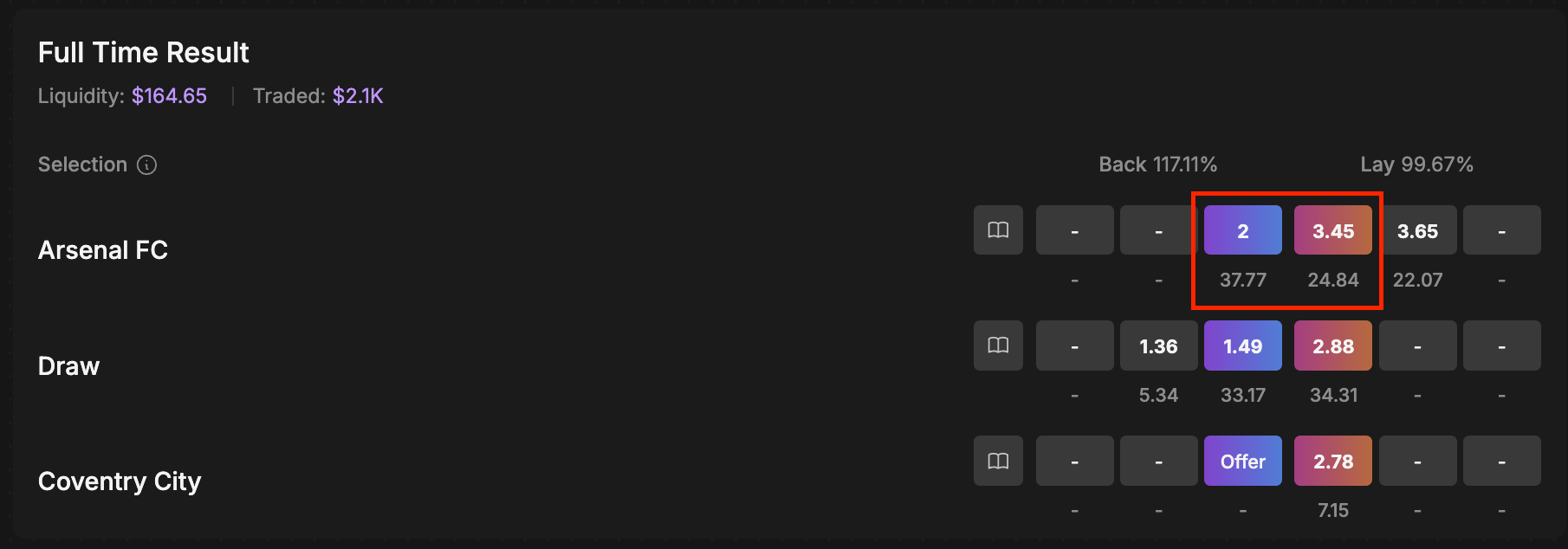
4. Creating Wallets
When a new user signs up on your app / platform, you would create them a wallet using POST/wallets. The reference used here can be anything, but should be unique & tie to some sort of user id on your platform side (for example just incrementing numbers 1,2,3,..etc; or some random string like abcde-12345-fghij-678910) Description can be anything, such as a username your users have set. So if you had 100 users sign up, then you would have 100 unique wallets.5. Placing Bets
Using the accessToken from the session generated (see Authentication above), then when a user comes to placing a trade via your platform, your platform should call POST/orders with- accessToken in the request header as authorization
- the user’s unique walletId in the body
- all other required bet details in the body
6. Charging Commission
As outlined above, ‘commission’ is something App builders have the ability to add on top of platform fees (which we collect). This would be paid by your end users (if they make a profit on a market), to you.6.1 Setting a default commission rate
Simply call POST/apps/{id}/commission-rates with the desired % in the request body. Commission rates can have a value between 0.0 and 1.0, where e.g., 0.01 would be 1% of the profit.6.2 Overriding the default rate per bet
If you wish to charge a different commission rate without changing the default, simply includecommissionRateId in the order request.
commissionRateId in the order request, the app’s defaultcommission rate will be used (or 0% if not set). This might be useful if you wish to drive promotions and charge less commission than the default.