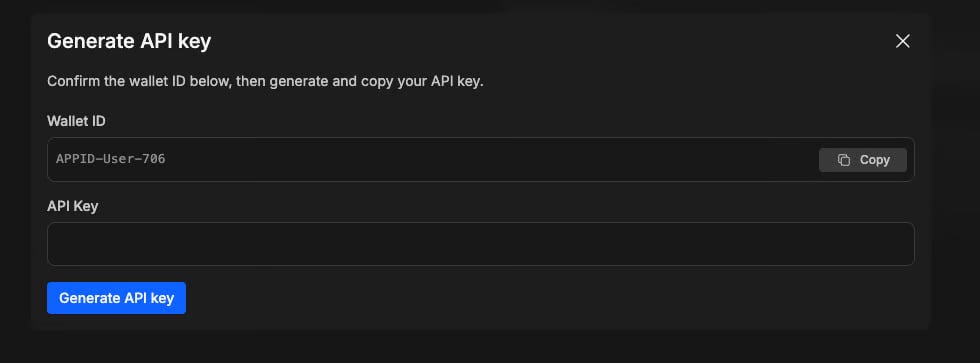
In order to use our APIs, you require:
  • An ‘App ID’
  • An ‘API Key’
  • A ‘Wallet ID’
​The App ID & API Key are needed to create a ‘session’ to get an ‘accessToken’. The Wallet ID is required to make various requests such as placing/cancelling/viewing orders.

Step-by-step process

  1. From anywhere on BetDEX, click on your balance
  2. Click on “API”
Image
  1. Click “Generate API Key”
Image
  1. Read the T&Cs. If you agree, then select the checkbox and click “Continue”
  2. After accepting the T&Cs, click “Generate API Key”
Image
  1. That’s it! You will now be given your unique API key. Please ensure you securely save & store the API key, as it cannot be retrieved again.

What if I lose my key, or if it’s compromised?

​If you lose the key, or believe it compromised, you can deactivate it and generate a new one from scratch.
  1. Go to https://betdex.com/account?tab=api-key
  2. Click on ‘Deactivate API key’ & ‘Confirm’
  3. Then click ‘Generate new key’ to get the new key

Why is it asking me to verify account?

​You must have completed “Basic Verification” to sign up to trade via our API. You can do this by going to https://betdex.com/account?tab=personal and submitting your personal details. ​Once that is completed, head back to https://betdex.com/account?tab=api-key (or simply click the “API” tab again) and you will be all set to generate the API key following the steps above.

Any other issues?

​As always, if you are facing any issues with generating your API key, or have any questions / feedback for us, please don’t hesitate to reach out via Live Chat and one of our team will assist you as quickly as possible.